Réseaux & Télécom
(5)
Réseaux & Télécom
(5)
 Système d’information
(12)
Système d’information
(12)
 Poste de travail
(13)
Poste de travail
(13)
 EMAIL
(7)
EMAIL
(7)
 Communication
(4)
Communication
(4)
 Documentation
(1)
Documentation
(1)

 Outils collaboratifs
(12)
Outils collaboratifs
(12)
 Conférence à distance
(5)
Conférence à distance
(5)
 Organisation SI
(25)
Organisation SI
(25)
 Sécurité des systèmes d’information
(4)
Sécurité des systèmes d’information
(4)
 Informatique scientifique
(1)
Informatique scientifique
(1)
 Innov’Space
 Calcul haute performance
(16)
Calcul haute performance
(16)
 Digital Learning
(10)
Digital Learning
(10)
 Logiciels en licence éducation
(5)
Logiciels en licence éducation
(5)
 Locaux numériques
(6)
Locaux numériques
(6)
 Gestion administrative
(9)
Gestion administrative
(9)
 Ressources humaines
(5)
Ressources humaines
(5)
 Scolarité
(2)
Scolarité
(2)

FOIRE AUX QUESTIONS – PSC PREVOYANCE – PERSONNEL MILITAIRE
Publié le lundi 15 septembre 2025
Dernière modification le 7 octobre 2025.
FOIRE AUX QUESTIONS – PSC PREVOYANCE – PERSONNEL MILITAIRE
Il s’agit d’une couverture sociale complémentaire que l’Etat a souhaité mettre en place pour ses
agents.
La réforme de la PSC en prévoyance combine les garanties mises en œuvre par l’employeur (garanties statutaires) et les garanties mises en œuvre par un organisme complémentaire dans le cadre d’un contrat collectif.
Pour les militaires, dans la mesure où les garanties statutaires sont principalement centrées sur les risques survenus en service, les garanties complémentaires sont, elles, centrées sur les risques survenus hors service.
Le décret n°2025-326 du 9 avril 2025 relatif à la protection sociale complémentaire en matière de prévoyance du personnel militaire est pris en application du II de l’article L. 4123-3 du code de la Défense. Cette texte précise les principes du régime facultatif en prévoyance notamment concernant le champ d’application et les bénéficiaires, les garanties couvertes et les cotisations des adhérents.
Le régime comprend des garanties de couverture des risques de décès, d’incapacité et d’invalidité, à titre complémentaire et additionnel. Il détermine les modalités de participation financière des employeurs dont relèvent les militaires et les dispositifs de solidarité entre les bénéficiaires.
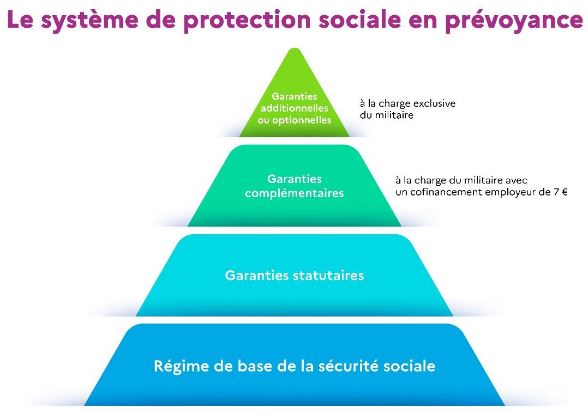
Le contrat collectif à adhésion facultative contient des garanties dites « complémentaires ». Ces garanties viennent compléter les garanties statutaires.
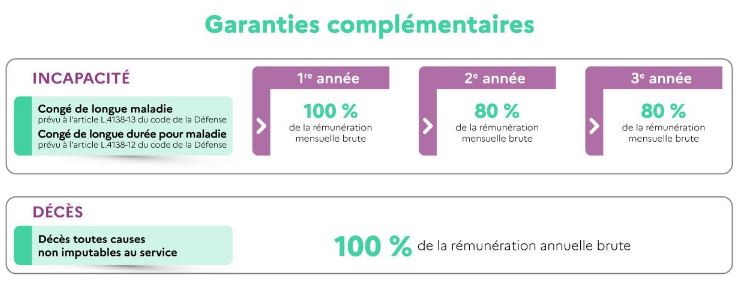
Les garanties complémentaires couvrent les risques suivants :
- Au titre du risque d’incapacité : le congé de longue durée pour maladie prévu à l’article
L.4138-12 du code de la défense et le congé de longue maladie prévu à l’article L.4138-13.
Ce risque est assimilable au risque « incapacité temporaire totale de travail » (ITT).
Pour les garanties incapacité, l’assiette servant au calcul de la prestation mentionnée est identique à celle mentionnée à l’article R. 4138-52 du code de la Défense ; la prestation est servie après déduction, le cas échéant, des sommes versées par l’employeur et les régimes de sécurité sociale.
- Au titre du risque décès : le décès non imputable au service. Cette garantie est un capital-
décès. Le capital peut également être versé du vivant du bénéficiaire en cas de perte totale et
irréversible d’autonomie (PTIA) ou d’incapacité permanente et absolue (IPA).
Le capital-décès prévu par les garanties complémentaires est égal à un an de rémunération brute, toutes primes et indemnités incluses.
Le montant du capital-décès complémentaire est calculé par l’organisme titulaire en fonction de la rémunération du militaire au moment du décès, indépendamment du montant du capital-décès statutaire calculé par l’administration.
Le détail des garanties complémentaires figure dans le tableau ci-dessous :
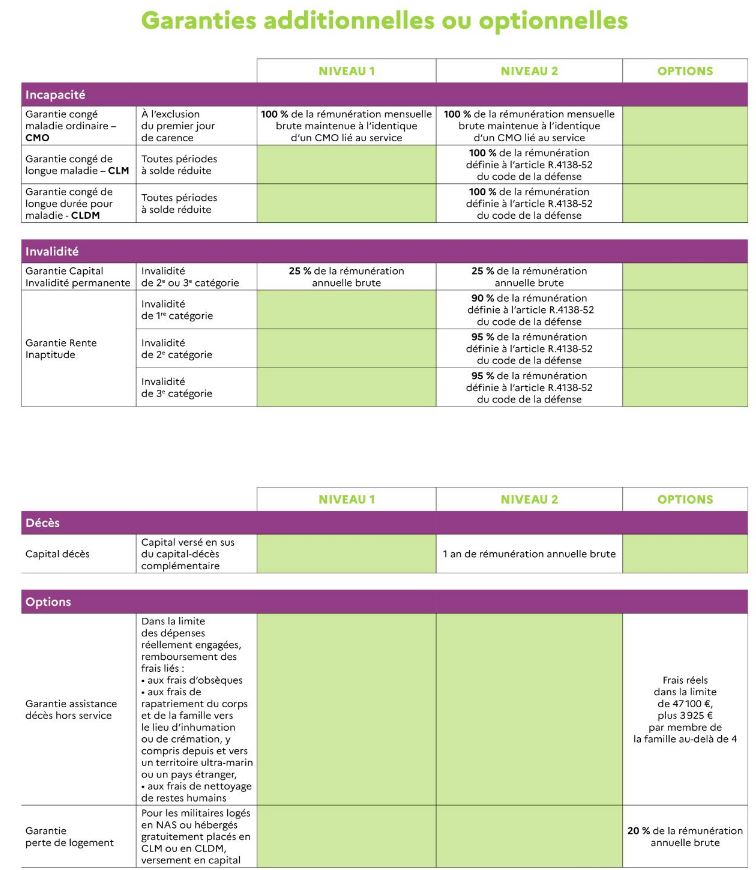
Afin de proposer des garanties adaptées aux besoins des assurés, des garanties additionnelles et optionnelles peuvent être souscrites par ces derniers. Elles ne peuvent être souscrites qu’en
complément des garanties complémentaires.
Les garanties optionnelles sont assimilables aux garanties additionnelles.
Sont définis :
- deux niveaux de garanties additionnelles : le niveau 1 et le niveau 2 ;
- deux types de garanties optionnelles qui peuvent être souscrites en plus du niveau 1 et du niveau 2.
Le contenu des garanties et le niveau des prestations sont détaillés dans le tableau ci-après :