Plan Vigipirate rehaussé au niveau urgence attentat. Restez vigilants et informés. En savoir plus

FREQUENTLY ASKED QUESTIONS - Time and absence management

Internal flexitime rules :
https://idol.isae.fr/nuxeo/nxfile/default/b6c7171f-0d84-403e-b449-d80dec1fcfe5/blobholder:0/REGLEMENT%20INTERIEUR%20HV.pdf

Absence regulations :
https://idol.isae.fr/nuxeo/nxfile/default/b0444d60-45b4-48d0-8e26-67e65730b832/blobholder:0/REGLEMENT%20DES%20ABSENCES.pdf

Telework internal rules :
https://idol.isae.fr/nuxeo/nxfile/default/1ccf9e97-641f-4e61-8188-283a7ac0c105/blobholder:0/REGLEMENT%20INTERIEUR%20TELETRAVAIL.pdf

BADGEAGES

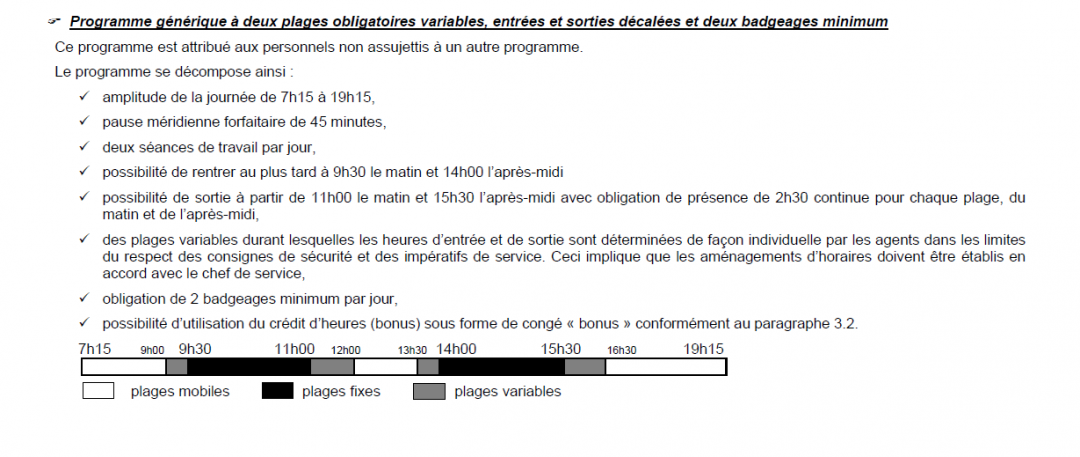
  • Mornings can start from 7.15am to 9.30am.
  • Mornings can be left from 11am.
  • The afternoon session must start before 2pm.
  • You may leave in the afternoon during the following period: 3.30 p.m. to 7.15 p.m.

Please find attached a document explaining the flexitime system:
If you have forgotten to clock in or your badge has not been registered, you can rectify the situation on Chronos :
Self service (tab) —> Forgot badge declaration (WJB) —> New declaration —> Specify date and time of badge —> Save.
If there is a problem with a badge, you must submit a ticket desk to the Time Management department requesting that it be deleted.

You must sign out when you are absent for an activity or occupation, and sign back in when you return.
This does not exclude badging at the end of the day. As a reminder, badges work in pairs: an entry badge must always be followed by an exit badge.

If you are present at ISAE at the start and end of your assignment: When you leave on an assignment, you must use the F2 function on the badge reader, then swipe your badge. This will activate “mission” mode. When you return to ISAE, you will have to use the F2 function again to end the mission.

If your assignment starts the following day and you will not be present at ISAE that day: Unblock F2 when you leave the establishment. Then sign in as normal when you returnto ISAE.

If you are present at ISAE on the day you leave on an assignment and absent from ISAE at the end of the assignment: Unblock F2 when you leave the establishment to go on an assignment. Then sign in as normal on your return.

To avoid any anomalies, you must ensure that you always have an even number of badges.

If your course is taking place on the ISAE site or if you are able to sign in, the usual procedure will apply.

However, if you are unable to sign in, the Continuing Education department will inform Time Management, who will programme your account as “training ” for the period concerned.
You will therefore have no action to take in Chronos.

HOLIDAY ENTITLEMENTS AND TIME OFF

If you have been on sick leave, operational reserve or maternity/paternity leave, all these absences will have an impact on your RTT balance(13 absences minus 1 RTT).
Otherwise, please contact the HR Time Management department by ticket desk.

You are entitled to 5 working days’ exceptional leave on the occasion of your wedding.

This leave must be taken within a reasonable period around the date of the event.
The marriage of your direct descendants also entitles you to 2 days’ special leave.

If the wedding takes place more than 200 km (return journey) from your home, extended leave may be granted for the journey time, up to a maximum of 48 hours each way.
To benefit from this, you must provide proof issued by the town hall (copy of the family record book, marriage certificate, etc.).
The request must be made on Chronos, selecting the“CEFA” reason.

15 days per year, or on a pro rata basis.
This type of leave is available subject to the following conditions :

  • Having a legitimate child under the age of 16 (no limit for a disabled child)
  • Only one parent must be working for the Ministry of Defence, otherwise both are entitled.
    In order to validate this absence, the agent must provide medical evidence showing the need for the parent to be present, or theabsence of childcare facilities for the child (closure of crèche, school, etc.).
    The request must be made on Chronos, selecting the“CEGM” reason.

You should notify your pay manager of your departure by sending a letter of resignation, or of secondment if you are a civil servant.
If necessary, your leave and RTT will be recalculated in proportion to your presence.
If you are a civil servant moving to another administration, you will need to apply to the Time Management department by ticket desk for a certificate of leave and CET.
You will also need to follow the departure circuit in order to return your IT equipment.

In principle, entitlements are calculated over a calendar year (from 1 January to 31 December).
Any contract starting during the year or ending before this date must be calculated by the Time Management department, by means of a request on the ticket desk.

You or your line manager must inform the Time Management department via the ticket desk if you are present on a day when the company is closed.

You will then need to sign in or, failing that, submit the form for overtime worked:https://idol.isae.fr/nuxeo/nxfile/default/0412482e-64dc-4971-b42e-25a8c8311ea6/blobholder:0/Previsionnel%20et%20declaration%20HS.pdf

The hours worked may be recovered, or paid (for categories B and C), provided that they are recognised as overtime, within the limit of the authorised 48 hours per week.

This counter corresponds to the current years annual leave (excluding carryovers from the previous year) taken during so-called “off-season” periods.

These periods are defined as follows: 1 January to 30 April and 1 November to 31 December.
Leave taken during these periods gives entitlement to additional days of leave, in accordance with the following rule:

  • 1 additional day for every 5 days of leave taken,
  • 2 extra days for every 8 days of leave taken.

This type of leave can only be used from 1 November.
If your contract comes to an end before this date and your leave entitlement has already been used up, please contact the Time Management Department to convert this entitlement into standard annual leave.

The following can be carried over to year N+1, up to the end of the March holidays (the exact date will be communicated):

  • annual leave
  • seniority leave.
  • off-season leave.
  • overtime.

The following cannot be carried forward

  • RTT.

It is possible to donate days.
These days can be allocated to employees in one of the following situations:

  • Parent of a child under 20 who is seriously ill or dies before the age of 25
  • A close carer
  • Participating, as a firefighter, in the missions of a fire and rescue service

Please complete the attached form and send it to the Ticket Desk: https://idol.isae.fr/nuxeo/nxfile/default/77b03f62-e496-4915-b9f7-c2ac78d5e6ad/blobholder:0/Formulaire%20Don%20jours%20repos.pdf

If you are leaving or returning from an assignment, you can apply for compensatory rest.
To do so, please send the attached form, duly signed by your line manager, together with your travel order, to the Time Management Department: https://idol.isae.fr/nuxeo/nxfile/default/f6d6962d-b27f-4215-88d3-585394f6106f/blobholder:0/formulaire%20repos%20compensateur%20suite%20mission.pdf

It should be noted that compensatory rest credited in connection with a departure or return from an assignment must be taken within two months of obtaining it.

You may be entitled to exceptional days off in the event of afamily event, with a possible extension if the event takes place more than 200 km (return journey) from your home.
You may be granted additional travel time, up to a maximum of 48 hours each way.

  • Death of spouse, parent (father, mother), brother or sister, grandparent or parent-in-law: 3 days.
  • Death of a child: 12 to 22 days, depending on the child’s age.

The request must be made in Chronos, selecting the “CEFE ” reason.

You must first make a request to your line manager.
Once the request has been accepted, please provide your days or half-days of absence so that your Chronos account can be set up accordingly.
Thereafter, please note that your holiday and RTT entitlements will be affected and recalculated in proportion to the time you are present.

ABSENCES

As such, you are entitled to a special leave of absence toexercise your trade union rights.
This leave may include travel time if the journey exceeds 200 km.
You will be asked to submit a ticket via Ticket Desk to the Time Management Department.

In accordance with the internal teleworking rules, you are not allowed to telework for more than five consecutive days. If this is the case, you will need to return to the office, failing which medical proof will be required.

Furthermore, when you telework half-days, Chronos counts them as full days. In this case, please contact the HR department (Time Management) in order to place the telework.

The maximum number of days taken per week depends on a number of factors:

  • The number of days per week indicated in the initial telework request.
  • The maximum number of days teleworked is set at two per week.
  • In certain cases (disability, state of health), an exemption may increase the maximum to more than 2 days, for a renewable period of 6 months.
  • For pregnant women: The number of days can be up to 3 per week.

You can be absent for up to 31 days. Beyond this period, Chronos will block absence requests.
An exception is made for staff returning to their country of origin.

A bonus corresponds to half a day’s absence, deducted from your available time credit.
You can benefit from two bonuses per month.
Either a full day, or two separate half-days.
The request must be made on Chronos, by selecting the reason“BONUS”.

You can change your part-time schedule.
To make these changes, please contact the HR Time Management department.

LEARNER

Apprentices work a 35-hour week. As a result, they do not have any days off.

To comply with the ISAE closure schedule, apprentices also take advantage of these periods, which has an impact on their annual leave.

For example, in a calendar year, an employee has 25 days’ annual leave; an apprentice will therefore have 25 days - 11 days’ leave, giving a total of 16 days’ annual leave.

If you are at the end of your school cycle, you may be entitled to 5 extra days off to study for your final exams.
Please contact the Time Management Department to find out how to obtain this entitlement.

Your Chronos account may not be set up correctly or your school calendar may have changed during the year.
Please contact the HR department, via a Time Management ticket desk, to rectify the situation.

TIME SAVINGS ACCOUNT (SA)

Your CET can be opened after one year’s seniority at ISAE, or when you transfer from another administration.

The main condition for annual leaveand off-season leave is that the employee must have taken at least 20 days of annual leave during the year (this condition is adjusted according to the number of days worked).
RTT days are not subject to this rule.
The CET can be funded by CA, RTT, CHP or compensatory rest.
No more than 10 days may be added tothe CET each year .
For more information, please consult the following page: Time Savings Account - Reminder of the rules

At the end of the year and at the beginning of the new year, you will be asked to submit an option form to the Time Managementdepartment via Ticket Desk.
You will then have three options:
1.keep the days beyond 15 on your CET. This is subject to the regulatory ceiling of 60 days and the 10-day progression threshold since the last campaign.
2.request payment for these days(half-days cannot be compensated).
3 For civil servants : pay these days into the additional civil service pension scheme.

  • If you have more than 15 days: you can be compensated for days in excess of 15.
  • If you have less than 15 days: these days must be taken or donated.
  • If you are joining another public administration (civil servant, government worker or contract employee), please contact the Time Management Department to obtain a CET certificate to send to your future employer to transfer your CET.